TOTAL CONTROL FCM-1D100-S2P Touchscreen Interface
( Brand: Total Control ), ( Manufacturer Part Number: FCM-1D100-S2P )
Review TOTAL CONTROL Lot Of Touchscreen Interface Fcm1d100s2p
The Total Control FCM-1D100-S2P Touchscreen Interface FCM1D100S2P is a state-of-the-art control system designed for automation and monitoring applications. This interface boasts a 10.4-inch high-resolution touchscreen display, providing crystal-clear visuals and an intuitive user interface.
The FCM-1D100-S2P is equipped with a powerful ARM Cortex-A9 processor, ensuring smooth operation and fast response times. It supports a wide range of communication protocols, including Modbus, Profibus, and Ethernet, making it compatible with various automation systems.
The touchscreen interface features a user-friendly layout with customizable screens, allowing you to tailor the display according to your specific needs. It also includes various graphical tools for data visualization, such as trend charts, histograms, and waveforms.
The FCM-1D100-S2P is designed with durability in mind, featuring a robust aluminum chassis and a front glass protected by a scratch-resistant coating. It is also IP65 rated, making it resistant to dust and water splashes, ideal for use in harsh industrial environments.
In addition, the interface includes two Ethernet ports and four RS-485 ports for connecting various devices. It also supports USB and SD card storage, providing ample space for data backup and file transfer.
The Total Control FCM-1D100-S2P Touchscreen Interface FCM1D100S2P is not just a control system; it is a comprehensive tool for monitoring and managing your automation applications. Its advanced features, robust construction, and versatile connectivity options make it an excellent choice for industries seeking reliable and efficient control solutions.
Pros of buying FCM-1D100-S2P Touchscreen Interface FCM1D100S2P:1. Enhanced User Interface: The touchscreen interface offers a more intuitive and user-friendly experience compared to traditional buttons and knobs.
2. Customizable Layout: Users can customize the layout of the interface to suit their specific needs and preferences.
3. Improved Efficiency: The touchscreen interface allows for faster navigation and operation, reducing the time spent on setting up and adjusting the system.
4. Modern Appearance: The touchscreen interface gives the control panel a modern and sleek appearance, enhancing the overall aesthetic of the system.
5. Easy to Clean: The touchscreen interface is easy to clean, reducing the risk of contaminants building up on the surface.
Cons of buying FCM-1D100-S2P Touchscreen Interface FCM1D100S2P:1. Initial Cost: The touchscreen interface is more expensive than traditional control panels with buttons and knobs.
2. Technology Dependency: The touchscreen interface relies on technology, which may be prone to malfunctions and require regular maintenance.
3. Learning Curve: Users may need to spend time learning how to use the touchscreen interface, which may be a barrier for some.
4. Durability Concerns: Touchscreens can be vulnerable to damage from physical impact or harsh environmental conditions.
In conclusion, the FCM-1D100-S2P Touchscreen Interface FCM1D100S2P offers several advantages, including enhanced user interface, customizability, improved efficiency, and modern appearance. However, it also has some disadvantages, such as initial cost, technology dependency, learning curve, and durability concerns. Ultimately, the decision to purchase the touchscreen interface depends on the specific needs and budget of the user. If the benefits outweigh the drawbacks and the user is willing to invest in a modern and user-friendly control panel, then the FCM-1D100-S2P Touchscreen Interface FCM1D100S2P is a worthwhile investment.
Recommendation: If the user is looking for a modern and user-friendly control panel that offers enhanced functionality and customizability, then the FCM-1D100-S2P Touchscreen Interface FCM1D100S2P is a solid choice. However, users should be aware of the initial cost and potential durability concerns, and consider whether these disadvantages are worth the benefits they offer. Ultimately, the user should weigh the pros and cons of the touchscreen interface and make a decision based on their specific needs and budget.
Details:
part #: fcm1d100s2p price
- $850.00
specifications plcmechanize:
- brand: Total Control
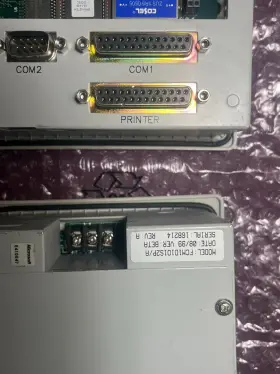
- manufacturer part number: FCM-1D100-S2P
general plcmechanize:
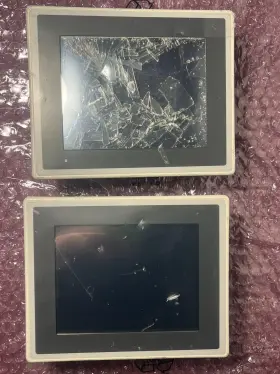
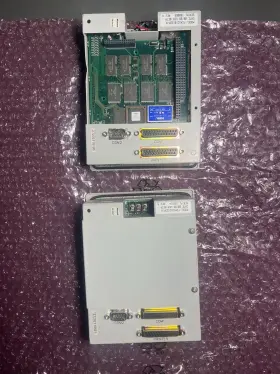
- condition: For parts or not working
- Industrial Automation Motion Controls > PLCs HMIs > PLC Processors
payments plcmechanize:
- other
- credit card: Discover
- wallet: Google-pay
seller plcmechanize:
- # reviews: 136
- city: Rancho Cucamonga, California
- rating: 100.0%
shipping plcmechanize:
- cost: $10.17
- carrier: FedEx, USPS
- type: Calculated
- class: Economy, Standard
- transit: 5-11 Days
- service: FedEx Ground Economy, USPS Ground Advantage
returns plcmechanize:
- paid by: Buyer
- time: 30 Days
- method: Money back
- policy: Returns Accepted
offer plcmechanize:
- best offers: True
- sold: 0
- started: October 8, 2024
- options: Ship-to-home
- availability: In Stock
- quantity: 1
Total Control FCM-1D100-S2P Is Similar To:
- Quickpanel Qpk2d100l2p Total Control Products Jr Pro-face Ser A Tsc (36% similar) Pro-face sear. Total Control products QPK2D100L2P quick panel jr. A SC jch PRA48, manufacturer: Total Control products model: QPK2D100L2P type: him Controller platform: quick panel jr voltage : 20.4-27.6 CDC, for parts or not working...(September 14th, 2024)
- Total Control Products Qpj2d100s2p Works Quickpanel Jr Ser A (39.7% similar) Touchscreen still works. A15, QPJ2D100S2P sear. Works Total Control products; quick panel jr. Used and works but screen has issues as you can see the pictures...(September 24th, 2024)
- Total Control Products Qm1104r0a Quick Marquee Red 4-1 2 Inch X36 (38.5% similar) Total Control products QM1104R0A quick marquee red is a 4-1/2 X36 display board designed for use in industrial automation and motion Control systems. If you, buy 2 get 10% off, 3/1 4% off 4/1 8% plus these are probably better to ship on a pallet buy. Made by Total Control products, this plc...(April 24th, 2025)
- Quickpanel Qpk2d100l2p-e Total Control Products Hmi Jr 6 Inch 24 V 2780051-01 (35.1% similar) With a 24V power supply, this him allows for easy operation and monitoring of plc processes. Is a 6 touch screen interface designed for industrial automation and motion Control systems. Model 2780051-01 offers a user-friendly interface for Controlling complex systems with precision and...(May 20th, 2026)

1 offer $850.00 USD
- Used. Offer #1 priced at $850.00 + $9.95 delivery = $859.95* total. +$9.95 shipping